
Instead of repeatedly sending an insurer a loss statement that lacks the required signature or notarization, confirm its form requirements, complete the statement, sign before a notary if required, and submit the finished document through the insurer’s approved channel. For a notarized affidavit of loss insurance claim in 2026, the insurer’s instructions control the form and submission; the notary verifies the signing, not the loss.
- For a notarized affidavit of loss insurance claim, get the insurer’s required form and submission instructions before signing.
- Signature on Demand is best for Clark County claimants who need a mobile or remote online notary, not claim advice.
- Keep the affidavit, supporting records and submission confirmation together; notarization alone does not file a claim.
Why this matters
An affidavit of loss is a signed statement about what happened to property or a document. An insurer might instead ask for a sworn proof of loss, another claim form, or supporting records. Do not treat those names as interchangeable: ask which document your insurer requires for this claim. Sending the wrong form can leave you with a notarized document the insurer did not request.
Notarization addresses the signing process. It does not establish that the reported loss occurred, confirm coverage, or mean the insurer has accepted the claim. In 2026, keep those jobs separate: prepare an accurate statement, complete the required notarial act, then submit the claim materials as instructed. Signature on Demand provides Nevada document preparation and mobile or remote online notary services for people in Clark County; the insurer decides what satisfies its claim requirements.
Before you start
- Get the insurer’s instructions. Ask for the exact form or required wording, the claim number if one has been assigned, where to send the document, and any deadline stated by the insurer or your policy. Ask specifically whether the insurer requires notarization and whether it accepts remote online notarization.
- Gather records that support your account. Have the date and location of the loss, a description of the affected property or missing document, and any records the insurer requests. Keep estimates and supporting materials distinct from facts you can personally attest to.
- Arrange an acceptable signing method. For an in-person appointment, bring identification the notary can accept and leave the signature unsigned until the notary directs you. For a remote appointment, confirm the insurer accepts a remotely notarized document and ask the notary about the identification and technology requirements before you begin.
The mid-setup trap: a notarized affidavit is not automatically a sworn proof of loss. If the insurer supplied a form, use that form unless the insurer tells you otherwise. A notary does not choose the right insurance form or decide whether your statement meets the policy’s requirements.
Confirm the claim document
- Ask the insurer what it needs. Identify the document by its exact name in the insurer’s instructions. If the request says affidavit of loss, ask whether the insurer provides a template or specifies language that must appear in it.
- Confirm the notarial requirement. Ask whether the signature needs an acknowledgment or a sworn statement administered by the notary. Do not choose a notarial act from a generic template when the insurer has given different instructions.
- Check the submission route. Confirm whether the insurer wants an original document, a scan, or another accepted format. Record the destination and any deadline shown in your claim instructions or policy.
Expected result: you have the required document, know whether notarization is necessary, and know how the insurer wants to receive it. If any of those points is unclear, settle it with the insurer before arranging a signing.
Prepare the loss statement
- Match the claim to the document. Enter the claim number if the insurer assigned one, and use the same identifying details that appear on the claim. If no number exists yet, follow the insurer’s directions for identifying the submission.
- Describe only what you know. State what was lost or damaged, when and where you became aware of it, and the basis for any ownership or loss details the form requests. Separate an observation from an estimate or information someone else provided.
- Review every attachment. Check that photographs, receipts, correspondence, or other requested records match the statement and are legible. Keep originals available if the insurer requests them.
- Leave signing for the appointment. Check with the notary before filling in any signature or notarial section. Do not alter a completed notarial certificate yourself.
Expected result: the document is complete enough for the scheduled signing, with its supporting records organized separately. The notary can handle the notarial act; the insurer remains responsible for reviewing the claim.
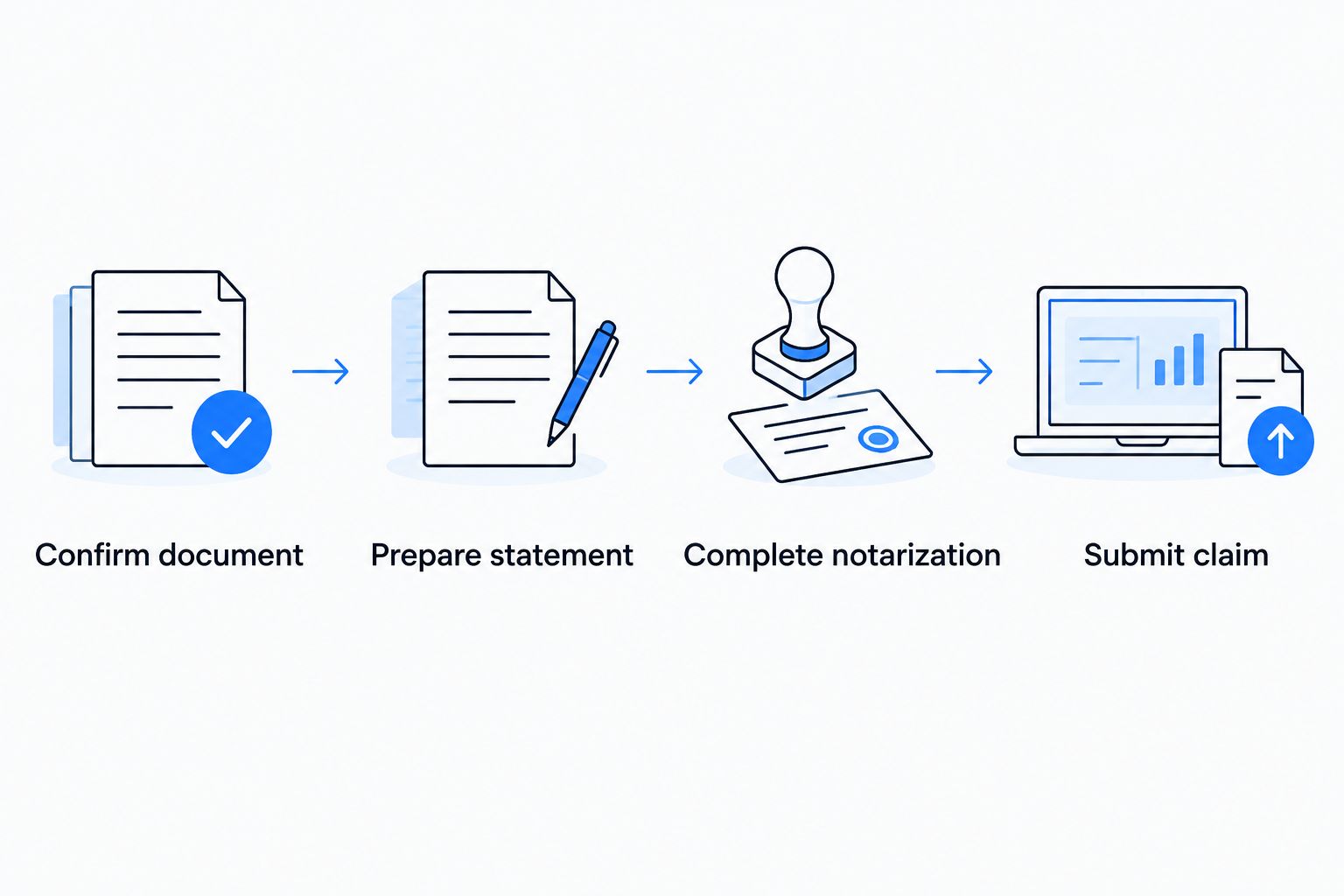
Complete the notarization
- Choose a signing method the insurer accepts. An in-person notary works when the insurer requires a physical document or you prefer to sign face to face. Remote online notarization is an option only when the document and receiving insurer permit that route.
- Bring the final document and acceptable identification. The notary must complete the identification and signing steps required for the notarial act. Ask about identification requirements before the appointment rather than assuming a particular card or digital image will work.
- Sign as the notary directs. If the document calls for a sworn statement, follow the notary’s instructions for the oath or affirmation. Review the completed document for missing pages or an incomplete notarial certificate before you leave the session.
Expected result: you have a completed document ready for the insurer’s submission process. Signature on Demand is best for Clark County residents who need a mobile or remote online notary for an insurer-required signing; it does not determine coverage or approve insurance claims.
| Signing option | Best for | Advantage | Limitation |
|---|---|---|---|
| Mobile notary | A Clark County signer who needs an in-person appointment at a convenient location | The signer and notary meet face to face | You must coordinate a physical appointment and the insurer’s document requirements |
| Remote online notary | A signer whose insurer accepts remote notarization | The notarial session can take place remotely | Insurer acceptance and session requirements must be confirmed first |
| In-person notary at a fixed location | A signer who can travel and needs an in-person signing | The document is handled in person | You must bring the correct form and identification to that location |
The table compares signing methods, not their acceptance by a particular insurer. In 2026, ask the insurer which completed format it will accept before you choose one.
Submit the claim materials
- Check the completed affidavit against the instructions. Make sure the required pages and any insurer-requested attachments are present. A clear statement does not replace a separate claim form if the insurer requires both.
- Send it through the approved channel. Use the insurer’s stated submission method and destination. If you are unsure whether to send an original or a copy, ask before mailing or uploading the document.
- Save proof of submission. Keep a copy of what you sent and any receipt, confirmation, or correspondence the insurer provides. Record follow-up requests with the same claim materials.
Expected result: the insurer has the document through its chosen channel, and you have a record of what was submitted. A completed notarization is a step in this workflow, not the endpoint.
Variant: replace or correct a statement already submitted
An insurer can ask for a corrected statement or additional detail after receiving the first version. Treat the revised document as a new submission, not as permission to edit a signed and notarized page.
- Get the requested correction in writing when possible. Identify whether the insurer wants a new affidavit, an amended form, or a separate explanation.
- Prepare a clean document. Make the requested change without writing over the prior signature or notarial certificate. Keep the earlier version in your claim records.
- Repeat notarization if required. Ask the insurer whether the revised document must also be notarized, then complete a new signing when instructed.
- Send the revision with its claim identifier. Follow the insurer’s directions for connecting it to the existing claim, and keep the new submission confirmation.
Expected result: the insurer receives the requested revision without an altered notarized document. This 2026 workflow also applies when a supporting record changes after the original submission: ask what the insurer wants updated before replacing anything.
Troubleshooting
- The insurer rejects the affidavit because it wanted a different form. Request the required form and ask which details from the existing statement need to be repeated. Do not assume a notarized statement replaces a sworn proof of loss.
- The document was signed before the notary appointment. Tell the notary before the session. The appropriate next step depends on the required notarial act; do not add a certificate to an earlier signature yourself.
- The insurer will not accept the remote version. Ask what format it accepts, then arrange an in-person signing if required. Confirm that requirement before repeating the appointment.
- A name or claim detail does not match the insurer’s records. Ask the insurer which identifier needs correction. Prepare a clean replacement rather than changing a signed, notarized document.
- You cannot tell whether the claim was received. Check the insurer’s designated claim channel or contact the insurer with your submission confirmation. The notary cannot confirm receipt or claim status on the insurer’s behalf.
Customize your workflow
Build a small claim file before the signing: the insurer’s form, the current statement, requested supporting records, and the instructions for submission. That gives you a way to check the final document against the actual request instead of relying on memory at the notary appointment.
For a Clark County appointment, choose between travel and remote signing only after confirming what the insurer will accept. Signature on Demand offers both mobile and remote online notary services; neither service replaces the insurer’s decision about its form. If you need help preparing a Nevada document, describe the document and its intended recipient before work begins so its purpose is clear. Do not ask a notary to decide what your insurance policy covers or what amount to claim.
Arrange your notary signing
Confirm the insurer’s form and accepted signing method before booking.
FAQ
Does an affidavit of loss for an insurance claim need notarization?
It needs notarization when the insurer’s instructions or applicable document requirements call for it. Confirm the required form and signing method with the insurer before arranging a notary.
Is an affidavit of loss the same as a sworn proof of loss?
No, do not assume the documents are interchangeable. Use the document the insurer requests and ask for clarification if its instructions name a sworn proof of loss.
Can I sign an affidavit of loss before meeting the notary?
Ask the notary before signing. The required notarial act determines how the signature must be handled, so bring the document unsigned unless instructed otherwise.
Can Signature on Demand submit my insurance claim?
Notarization does not submit a claim. Follow the insurer’s submission instructions and keep its confirmation; Signature on Demand provides document preparation and notary services, not claim approval.
Will an insurer accept a remotely notarized affidavit of loss?
Ask your insurer before booking remote online notarization. Acceptance depends on the insurer’s document and submission requirements.
What should I bring to an affidavit of loss notarization?
Bring the insurer’s required document and identification the notary can accept. Have any supporting records ready for the insurer, and confirm the notary’s identification requirements before the appointment.
What if I find an error after the affidavit is notarized?
Do not edit the completed notarized page. Ask the insurer whether it wants a replacement or amended document and whether the correction requires a new notarization.
One last thing
Ask the insurer about the form before asking a notary about the appointment. That single check establishes whether you need an affidavit, a sworn proof of loss, or something else. In 2026, Signature on Demand can help with the Nevada signing step, but only the insurer can confirm what belongs in its claim file.