
Instead of carrying a notarized deed between a notary, a document preparer, and the Clark County Recorder, organize the deed packet first, complete the notarization, then submit it through an e-recording provider that accepts Clark County filings. Signature on Demand is best for Las Vegas-area individuals and families who need Nevada deed preparation and notarization; confirm the separate e-recording submission route before signing.
- For a Clark County e-recording notarized deed, check the deed packet and submission route before the notary appointment.
- Signature on Demand is best for Las Vegas-area individuals and families needing Nevada document preparation and notarization.
- A notarized deed is not a recorded deed; keep the recorder's acceptance confirmation, not just the notary's certificate.
- For remote notarization, confirm the intended e-recording provider accepts that document format before proceeding.
Why this matters
A notary verifies a signing act; the Clark County Recorder handles recording. Those are separate events. You can leave a notary appointment with a completed deed and still have a document that has not been submitted or accepted for recording.
In 2026, the practical order is packet, notarization, submission, acceptance. If you are arranging Signature on Demand for deed-related document preparation or notarization, establish who will submit the finished packet before you schedule the signing. Signature on Demand's stated services include document preparation and mobile or remote online notarization; that does not, by itself, establish that the service submits deeds for e-recording.
Before you start
- Identify the deed and the people involved. Have the deed you intend to record, the property details, the signers' names, and any instructions from your attorney, title company, lender, or document preparer. Do not substitute a deed type based only on an online example.
- Confirm your submission route. Ask the person or business handling recording which e-recording provider they use for Clark County and who is responsible for submitting the packet. Access to a notary appointment is not access to an e-recording account.
- Resolve the format question before signing. Ask that submitter whether the deed will be signed on paper or through a remote online notarization process, and whether their receiving workflow accepts the resulting document. Changing formats after signing can mean arranging another execution rather than simply uploading a different file.
The gotcha: do not treat a scan of a paper-notarized deed as interchangeable with an electronically notarized original. Your submitter must tell you which format its workflow accepts. In 2026, settle that question while the document can still be prepared for the correct signing method.
Prepare the deed packet
- Confirm the recording county. Check that the property is in Clark County, Nevada. A Las Vegas mailing address alone is not the instruction that determines where a deed belongs; use the property's actual location and the transaction documents.
- Check the deed against the source records. Compare the names, property description, and parcel information on the prepared deed with the records and instructions available for the transaction. If they disagree, stop and have the responsible preparer or attorney resolve the discrepancy before anyone signs.
- Identify accompanying documents. Ask the submitter which declarations or supporting forms apply to this transfer. Nevada real-property transfers can raise Declaration of Value and real property transfer tax questions; the appropriate entries and any exemption claim depend on the transaction.
- Confirm the signing instructions. Identify every required signer, the intended notarization method, and whether the submitter needs a paper original or an electronic document. Keep the deed unsigned until the notary or other responsible professional gives the applicable signing instructions.
Expected result: you have one identified deed, the applicable supporting paperwork, and a named submitter who has confirmed the format. You have not yet assumed the deed is ready for recording merely because its text is complete.
A transfer between family members still needs its own documentation review. The relationship between the parties does not tell you which deed language, transfer-tax treatment, or supporting forms apply.
Complete the notarization
Mobile notarization and remote online notarization solve different access problems. Choose based on the document format your submitter accepts, not only on which appointment is easier to arrange.
| Signing route | Best for | Advantage | Constraint to resolve first |
|---|---|---|---|
| Mobile notary with a paper deed | Signers using a paper-document workflow | A notary meets the signer in person | Ask how the signed original will enter the e-recording workflow |
| Remote online notarization | Signers whose submitter accepts an electronic notarized deed | Signing can occur remotely | Confirm the submitter accepts the resulting electronic document before the session |
- Give the notary the correct document. Use the version approved for signing. Do not rely on a draft when another party has revised the deed or its property description.
- Follow the notary's identity and signing process. The notary handles the notarial act. Document preparation, advice about which deed to use, and recording are separate tasks; a standard notary commission alone does not authorize legal advice.
- Inspect the completed document before handoff. Check that the intended signers completed their portions and that the notarial certificate is present and legible. If anything appears incomplete, ask the notary and the responsible preparer what must be corrected; do not edit a completed notarial certificate yourself.
- Deliver it in the agreed format. Give the paper original or electronic notarized document to the named submitter using the method agreed before signing. Avoid converting, printing, rescanning, or altering an electronic notarized file without the submitter's instructions.
Expected result: the submitter has the signed, notarized deed in the format it agreed to handle. Notarization is a milestone, not proof of recording.
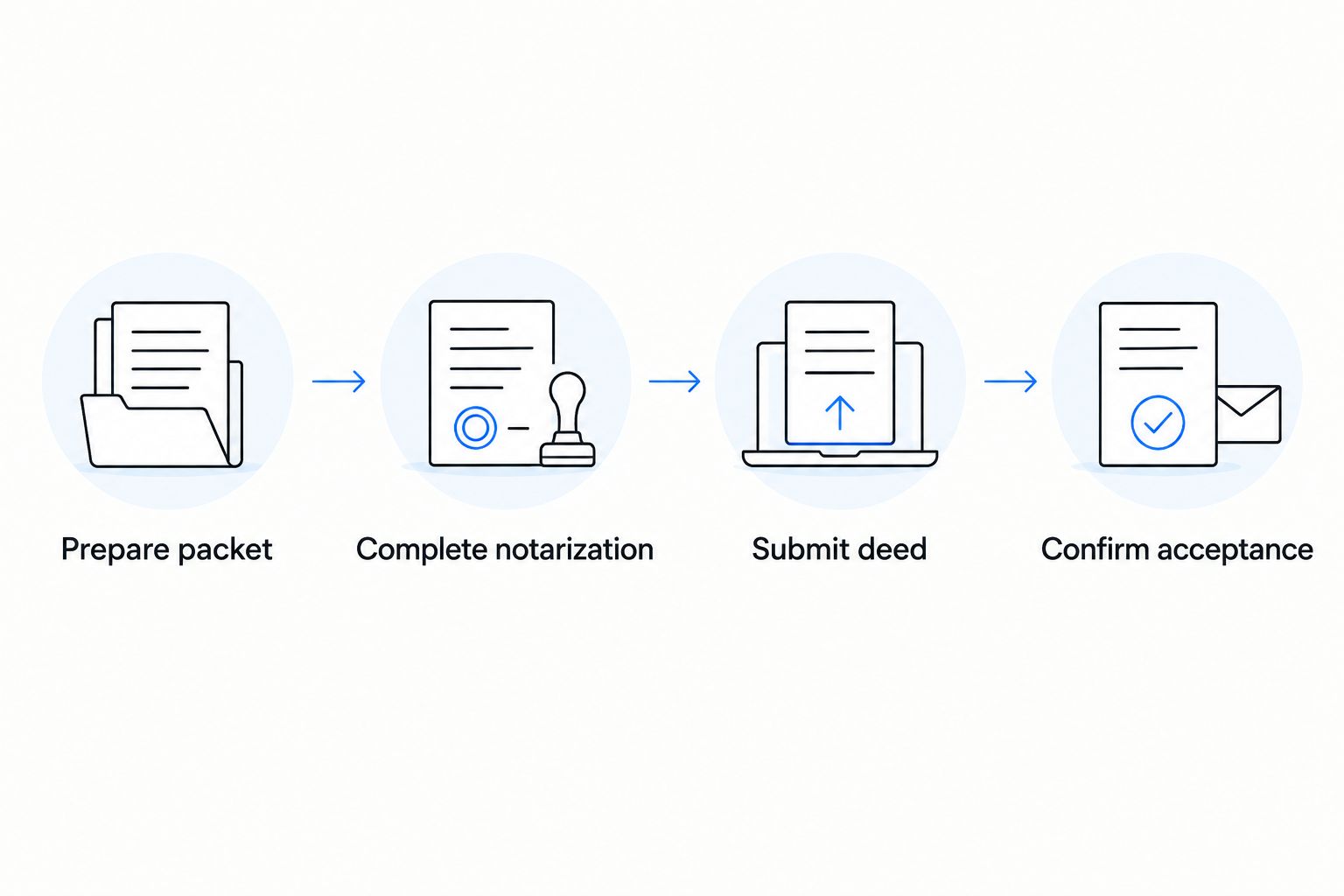
Submit the packet for Clark County e-recording
- Confirm who controls the submission account. Ask the title company, recording service, attorney, or other designated submitter to confirm that its e-recording provider handles Clark County deeds. Do not assume an individual can upload directly through the same account.
- Match the files to the submission instructions. Have the submitter check the deed, supporting forms, document format, and any transaction-specific information before transmission. A missing attachment or mismatched detail is easier to fix before submission than after a rejection.
- Have the authorized submitter transmit the packet. Follow that provider's current on-screen instructions. Button names and required fields differ by provider, so a label copied from another platform is not a reliable instruction for your account.
- Track the result. Ask for the provider's submission acknowledgment, then ask whether the Clark County Recorder accepted or rejected the document. A transmission receipt confirms that a packet was sent; it does not establish that the deed was recorded.
- Keep the recorded version. Once accepted, obtain the recorded deed or the recording details from the submitter and store them with the transaction records. If the packet is rejected, get the stated reason before changing the document.
Expected result: you have evidence of acceptance by the recorder, not just a completed notarial certificate or an upload confirmation. In 2026, that distinction is the final check in a Clark County e-recording notarized deed workflow.
Variant: start with a remotely notarized deed
Remote online notarization changes the signing handoff, not the need to confirm recording acceptance. Use this variant only after the intended submitter confirms it can receive the resulting electronic document.
- Ask the submitter to identify its accepted format. Give the answer to the person arranging the remote session before the deed is signed.
- Use the final deed version for the session. Resolve names, property details, and supporting paperwork beforehand. A remote session does not repair a deed prepared with the wrong information.
- Transfer the resulting document as instructed. Keep the electronic version in the form required by the receiving workflow. Do not assume that printing it creates the paper original the submitter needs.
- Follow the same acceptance check. Request the recorder's result through the submitter. If the document is rejected, ask whether the issue concerns format, deed content, or a supporting form before arranging another notarization.
Best for: a signer who needs remote access and already has a confirmed electronic submission route. Not best for: a transaction where the submitter requires a paper signed document or has not confirmed whether it accepts the remote-notarized file. Signature on Demand offers remote online notarization, but that service and e-recording acceptance remain separate decisions.
Troubleshooting
- The deed is notarized, but nobody has an e-recording account. Identify a submitter that handles Clark County deeds before sending the document anywhere. A notary's completed certificate does not create submission access.
- The submitter rejects the document format. Ask whether it requires a paper original, a different electronic format, or a differently prepared packet. Do not flatten or rescan an electronically notarized document as an improvised fix.
- The names or property description do not match the transaction records. Stop submission. Have the responsible preparer or attorney determine the correction; do not quietly change a deed after execution.
- A supporting declaration is missing or incomplete. Ask the submitter which form and transaction details are required. Do not select a transfer-tax exemption simply because the parties are related.
- You have an upload acknowledgment but no recording confirmation. Ask the submitter for the recorder's acceptance result or rejection notice. Treat the deed as unconfirmed until that result is available.
A rejection is a request to address a specific defect, not a reason to repeat every step automatically. Preserve the notice and resolve the stated problem before deciding whether a corrected document needs another signing or notarization.
Customize your workflow
If a title company or attorney already directs the transfer, put its signing and submission instructions ahead of a generic checklist. Ask for one named contact who can answer document-format questions and provide the final recording result. That keeps the signer, notary, and submitter from working from different versions of the deed.
If you are handling a family or estate-related transfer, separate the questions by role: the appropriate deed and transfer terms belong with the responsible legal professional; document preparation and notarization are distinct services; the designated submitter handles e-recording. Signature on Demand's Nevada document preparation and notary services fit the preparation and signing stages, not an assumed promise of recorder acceptance.
Arrange deed signing support
Ask about Nevada document preparation and mobile or remote notarization for your deed.
For a 2026 closing checklist, record the submitter's name, the agreed document format, who supplies supporting paperwork, and who sends you the acceptance result. Those details make the handoffs clear without confusing notarization with recording.
FAQ
Can I e-record a notarized deed in Clark County myself?
First confirm whether you have access to an e-recording provider that accepts Clark County deed submissions. If a title company, attorney, or recording service controls the submission, ask that party to confirm its process rather than assuming notarization gives you upload access.
Does notarizing a Nevada deed mean it has been recorded?
No. Notarization completes a signing-related step; recording requires submission and acceptance by the recorder. Keep the acceptance result or recorded document as your confirmation.
Can I e-record a deed completed by remote online notarization?
Confirm acceptance of the resulting electronic document with your intended e-recording submitter before the remote session. Remote notarization and e-recording are separate processes, and the receiving workflow determines the required format.
What should I check before signing a Clark County deed?
Check the deed version, signer names, property details, supporting paperwork, and the submitter's required document format. Have the responsible preparer or attorney resolve discrepancies before notarization.
What if my Clark County deed submission is rejected?
Get the rejection reason from the submitter before editing or resigning anything. The appropriate fix depends on whether the problem involves document content, a supporting form, or the submitted format.
Can a mobile notary choose the right deed for my transfer?
A standard notarial commission alone does not authorize legal advice about which deed to use. Direct questions about the legal effect of a transfer to an appropriate legal professional; confirm the notary's role before the appointment.
Does Signature on Demand submit deeds for Clark County e-recording?
The provided service description establishes Nevada document preparation and mobile or remote online notarization, not deed e-recording submission. Ask Signature on Demand directly who will submit your particular deed and who will confirm recorder acceptance.
One last thing
Ask for the recorded result, not just proof that someone pressed submit. That single request catches the gap between a finished 2026 notary appointment and a Clark County deed that the recorder has actually accepted. Keep the rejection notice if acceptance has not occurred; it tells the responsible party what to address next.