
Instead of taking a notarized divorce agreement to the courthouse and assuming the signature finishes the divorce, prepare the correct court packet, submit it through the court’s e-filing process, and check whether the filing is accepted. Signature on Demand is best for Clark County residents who need Nevada divorce document preparation and mobile or remote notarization, not legal representation.
- For notarized divorce agreement Nevada court e-filing, match the signed agreement to the correct divorce case before uploading.
- Signature on Demand helps Clark County residents with divorce document preparation and notarization; a judge, not a notary, grants the divorce.
- In 2026, save the submission confirmation, then check for court acceptance and a signed decree.
Why this matters
A notarized signature proves that a notarial act took place. It does not tell the court which divorce procedure you are using, establish that every required document is present, or make an agreement a court order. Those are separate steps in a 2026 Nevada divorce filing.
Start by identifying what you actually have: a joint petition signed by both spouses, an agreement for an existing divorce case, or a document that has not yet been prepared for filing. The joint petition divorce document guide covers the first path. An agreement on its own is not a substitute for the forms required for your case.
Before you start
- Identify the court and case status. Have the court name and any existing case number ready. Do not open a new case simply because you have a newly signed agreement; an agreement can belong in a case that is already open.
- Gather the complete filing packet. Keep the notarized document, the other forms required for your chosen divorce procedure, and any proposed order together. Use the current instructions for the court where you will file rather than a packet saved from an earlier attempt.
- Check the document’s format before notarization. A paper document scanned after an in-person notarization and a document completed through remote online notarization are different records. Confirm the receiving court’s submission requirements before choosing a method or converting files.
The mid-setup problem is usually not the upload. It is discovering that the notarized agreement does not match the case type or that the court expects a separate proposed decree. Resolve that before you sign or submit anything.
Prepare the packet
- Choose the filing path. If both spouses are filing a joint petition, use the current joint-petition instructions for the court with jurisdiction. If a divorce case already exists, follow that case’s instructions for filing the agreement and any related request or proposed order. An agreement cannot be assigned to a new or existing case by guesswork.
- Compare names and case details. Read every page of the agreement alongside the petition or existing case record. Make sure the spouses’ names, the court, and any case number are consistent. If a page refers to an attachment, include the attachment that actually belongs to that document.
- Separate documents by purpose. Keep the signed agreement distinct from a petition, a proposed decree, and any other required form. Uploading everything as one unidentified file makes it harder to select the right document type and spot a missing page.
- Review the court’s current instructions. In 2026, use the instructions for the Nevada court handling your case to confirm what must be signed, notarized, submitted, or presented for judicial review. Do this before scheduling the notarial appointment.
Expected result: You have a packet matched to either a new filing or an existing case, with each document identified by its purpose. You have not treated the notarized agreement as the entire divorce.
Complete notarization
- Check which signatures require a notarial act. Follow the instructions for the specific document and court. Do not add a notarial certificate to a form that does not call for one, and do not assume that notarizing one signature completes the other spouse’s paperwork.
- Choose an appropriate signing method. Signature on Demand offers mobile notary and remote online notary services. Confirm that the document and receiving court permit the method you plan to use before the signing begins. A standard notary witnesses the required act; the notary does not decide whether an agreement is legally adequate.
- Inspect the completed document. Check that the required pages are present, signatures appear where required, and the notarial certificate is complete and legible. If the original was signed on paper, make a readable scan without cutting off page edges or the certificate.
- Preserve the completed record. Keep the paper original if there is one. If the document was notarized online, retain the completed electronic document rather than printing and rescanning it without first checking the court’s instructions.
Expected result: You have a complete, readable notarized document in a format you can compare against the receiving court’s filing rules. In 2026, the notarial step still does not replace court filing or judicial approval.
Select the case
- Use the court’s current e-filing access instructions. Follow the filing route published by the court handling your divorce. Confirm that the court accepts your case type and your filer status through that route before creating a submission.
- Match the filing to the case. For an existing case, enter its identifying information as shown on the court record and verify the parties before adding documents. For a new case, select the divorce filing procedure that matches the packet you prepared. Do not select a joint petition because both people signed an agreement if the underlying case uses a different procedure.
- Check service requirements separately. Electronic submission to a court is not automatically service on another party. Follow the instructions that apply to your filing and case; a filing confirmation alone does not establish that service was completed.
Expected result: The e-filing submission points to the intended court and case path. Stop before uploading if the displayed parties, case number, or filing category do not match your documents.
Submit and verify
- Attach each required document under its proper filing category. Select the category that describes the document you are uploading. Keep a proposed decree separate when the court’s instructions call for one; the judge must review and sign an order before it becomes a signed decree.
- Preview the files. Open each attachment from the submission preview. Check page order, legibility, signatures, notarial certificates, and whether every required attachment is present. A filename is not proof that the right document was uploaded.
- Review before final submission. Confirm the court, case details, filing categories, and attached documents. Follow the portal’s displayed prompts to submit. Interface labels change, so rely on the labels shown in the court’s current filing system rather than instructions copied from an old screenshot.
- Save the confirmation and monitor status. Keep the submission record. Then check for an acceptance or rejection notice and read any reason the court provides. A transmission confirmation is not the same as acceptance, and acceptance is not the same as a signed divorce decree.
Expected result: You can identify what was submitted, whether the court accepted it, and whether a judge later signed the decree. If the filing is rejected, correct the stated issue before resubmitting; do not assume the original submission remains active.
The handoff in a 2026 divorce filing has distinct stages:
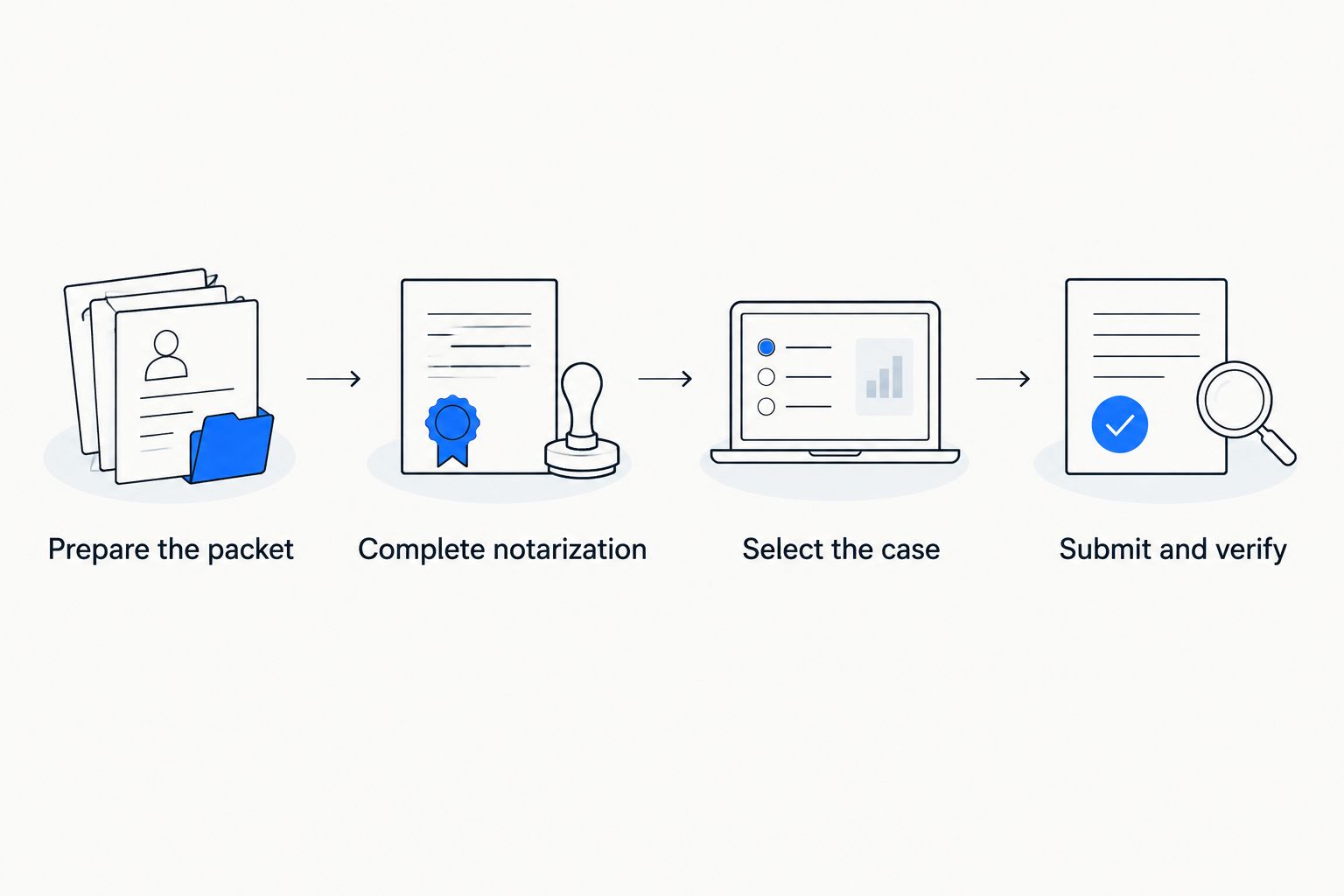
Filing an agreement in an existing divorce case
An existing case changes the workflow. Do not start a second divorce case to submit a newly notarized agreement. Locate the current case record first, then compare the agreement’s names and case number with that record. Follow the court’s instructions for the document type and any accompanying request or proposed order.
| Filing situation | Best for | What the notarized document does | Main limitation |
|---|---|---|---|
| Joint petition path | Spouses using the court’s joint-petition procedure | Provides signatures or statements where the required forms call for notarization | A separate agreement does not replace the required petition packet |
| Existing-case agreement | Parties who already have a divorce case | Records the signed agreement for submission with the appropriate case documents | Filing it does not itself turn the agreement into a signed order |
For 2026 notarized divorce agreement Nevada court e-filing, the case distinction determines where you submit the document. It also determines which instructions you must read. If you cannot tell whether the case is already open, establish that fact before preparing another filing.
A remote signing creates a second practical check: determine whether the court accepts the completed electronic record in the form you have. The Nevada remote online notary guide helps you compare the notarial route, but the receiving court controls its filing requirements.
Troubleshooting
- The portal cannot find the case. Recheck the court and case number against the existing case record. Do not create a new case to work around a lookup problem.
- The uploaded scan is unreadable. Re-scan the full page, including the signatures and notarial certificate, and preview the replacement before submitting. A legible paper original does not fix an unreadable uploaded copy.
- The packet is rejected as incomplete or misclassified. Read the court’s stated reason, compare it with the current instructions, and correct that issue. Repeatedly uploading the same packet does not address a missing form or an incorrect filing category.
- The submission shows as sent but not accepted. Keep checking the filing status and notices. Do not tell another party that the court accepted a document based only on your submission confirmation.
- The filing was accepted, but there is no signed decree. Check the case record and the court’s instructions for the next judicial step. Acceptance places documents in the filing process; it does not grant the divorce.
Customize your workflow
The right amount of preparation depends on where you are stuck. If the document has not been signed, settle the filing path and format first. If it has been notarized, inspect the completed record before uploading it. If you already submitted it, focus on the acceptance notice and case status rather than scheduling another signing.
Signature on Demand provides Nevada divorce document preparation and mobile or remote notarization for Clark County residents. Use document preparation for the forms and notarization for the required signing; use the court’s instructions for filing, and seek a lawyer for legal advice about the agreement’s terms. Those roles should not be collapsed into one step.
Prepare your divorce filing
Ask about Nevada divorce document preparation and mobile or remote notarization.
FAQ
Does a notarized divorce agreement finalize a Nevada divorce?
No. Notarization does not grant a divorce; the court must complete its review and a judge must sign the decree.
Can I e-file a notarized divorce agreement without a case number?
That depends on whether you are opening a new case or filing in an existing one. Identify the correct divorce procedure before submitting the agreement; do not open another case just to upload it.
Is a filing confirmation the same as court acceptance?
No. A filing confirmation records your submission, while an acceptance notice tells you the court accepted the filing. Neither is a signed divorce decree.
Should I scan a paper-notarized agreement or submit an online-notarized document?
Follow the receiving court’s current format requirements. Scan a paper document legibly, and check the court’s instructions before converting a completed electronic notarization.
Does e-filing serve my spouse with divorce papers?
Not automatically. Follow the service instructions that apply to your case rather than treating an upload confirmation as proof of service.
Can Signature on Demand give legal advice about my divorce agreement?
Signature on Demand provides Nevada document preparation and notary services, not legal representation. Ask a lawyer for advice about the agreement’s legal terms or your rights.
What should I do if the Nevada court rejects my divorce filing?
Read the rejection notice and correct the specific issue it identifies before resubmitting. Check the current instructions for your court and filing procedure.
One last thing
The most useful document to keep after e-filing is not just the notarized agreement. Keep the submission record, the court’s acceptance or rejection notice, and eventually the signed decree together; each establishes a different stage of the 2026 process.