
Instead of notarizing every LLC document before you file, separate the papers that actually need notarization from the state filing. For a Nevada SilverFlume LLC filing in 2026, prepare the formation information, handle any separate notarized documents, then submit the LLC filing through SilverFlume and save the state’s confirmation.
- Nevada SilverFlume LLC filing notarized documents are separate tasks; routine online formation does not require notarizing every LLC paper.
- Use SilverFlume for the Articles of Organization, Initial List and State Business License filing.
- Signature on Demand is best for Las Vegas filers who need document preparation or notarization alongside the state filing, not instead of it.
- Confirm who requires any notarized document before booking a notary; the bank or another recipient sets its own document requirements.
Why this matters
A notary verifies a signing under the applicable notarial rules; the Nevada Secretary of State receives and processes the LLC formation filing. A notarized operating agreement is not a substitute for filing Articles of Organization, and filing an LLC does not automatically notarize its private documents. Mixing those steps creates extra work without answering the question that matters: who needs each document, and in what form?
If you are gathering paperwork in 2026, start with the LLC document preparation guide for Las Vegas business owners. Keep the state filing checklist separate from requests made by a bank, another business or an individual receiving a signed document.
Before you start
- Get access to SilverFlume and your formation details. Have the proposed LLC name, registered agent information, management information and a way to retain the completed filing. A Nevada LLC needs a registered agent; do not enter someone’s details without confirming they have agreed to serve.
- Gather the documents you plan to sign separately. Identify the document, each signer, the recipient and the notarial act the recipient requests. Bring identification acceptable to the notary. Do not sign a paper in advance when the required act calls for the notary to witness the signature.
- Check the non-obvious handoff. Ask the recipient whether it needs an original paper document, an electronically notarized document or simply a copy. A remote online notarization does not turn a private LLC document into a SilverFlume filing, and a recipient’s acceptance rules can determine which format you need.
The 2026 rule: confirm the purpose of each paper before scheduling notarization. If nobody has asked for a notarized version and the applicable filing does not call for one, do not add a notarial step by default.
Document check
- Separate state forms from private LLC records. Put the Articles of Organization, Initial List of Managers or Managing Members, and State Business License filing on your SilverFlume checklist. Put an operating agreement, bank paperwork and any recipient-requested affidavit on a separate list.
- Check the requested signer and destination for each paper. An LLC manager signing a document for a bank is a different task from entering manager information in a state filing. Record who will receive the document so you can ask that person or organization what form it accepts.
- Confirm the LLC name and management details before submission. Compare every spelling against the information you intend to enter in SilverFlume. Resolve differences before anyone signs a related private document.
- Flag questions that call for legal advice. A document preparation service can help prepare documents and a notary can perform an authorized notarial act. Neither role replaces an attorney’s advice about ownership terms, liability or which management structure you should choose.
Expected result: you have one list of information for the state filing and a second list of documents whose recipients have actually requested signatures or notarization. Nothing is being notarized merely because it mentions the LLC.
The diagram shows the order: decide what each document is for, check any notary request, complete the portal entry, then verify the receipt. A completed notarial certificate belongs with the document it covers, not automatically with the state submission.
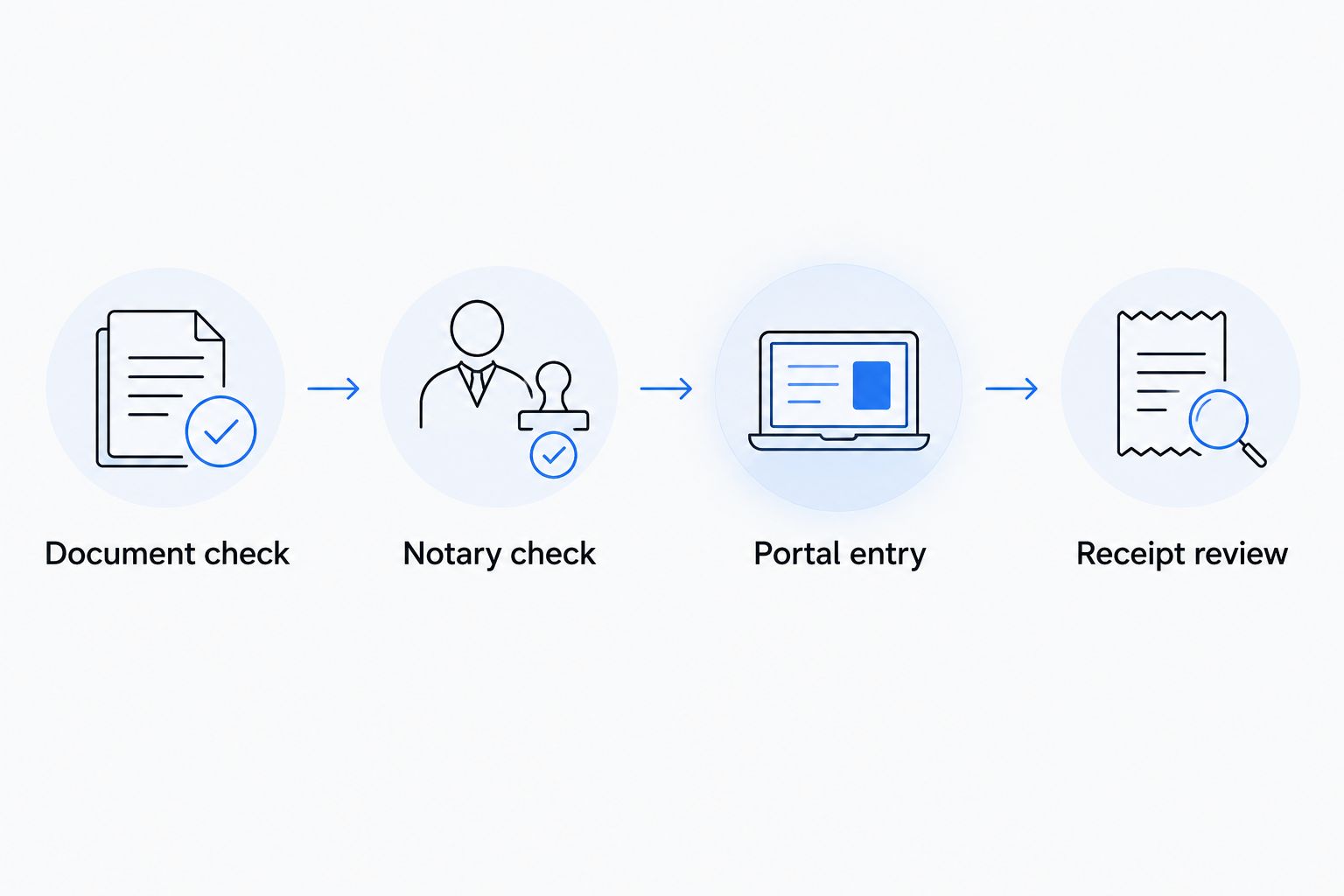
Notary check
- Ask whether notarization is required for the specific document. Get that instruction from the recipient or from the document’s stated requirements. Do not assume an operating agreement or every signature needs a notary simply because it relates to an LLC.
- Identify the notarial act before the appointment. The document or recipient should make clear what is needed. A notary cannot choose the act for you as a matter of legal advice or certify that your LLC terms are legally sufficient.
- Choose the signing format the recipient will accept. For an in-person signing, arrange for the signer and document to be present together. For remote online notarization, confirm the recipient accepts an electronically notarized document before proceeding; printing an electronic record does not, by itself, make it an original paper notarization.
- Review the completed document before sending it. Check that the intended signer signed the intended document and that the notarial certificate is complete. Then deliver it to the recipient that requested it, using the format that recipient specified.
Expected result: each notarized paper has a named recipient and a clear delivery method. It is ready for that recipient, not queued for a SilverFlume upload unless the state filing specifically asks for it.
For Las Vegas-area signers who need a notary to come to them, the mobile notary services guide covers that service category. Signature on Demand is best for Clark County filers who need Nevada document preparation or mobile or remote online notarization alongside an LLC filing; SilverFlume remains the state filing portal. The limitation matters: a notarized document does not complete formation, and the service does not replace legal advice.
Portal entry
- Sign in to SilverFlume through the Nevada Secretary of State’s business portal. Start the LLC formation workflow and follow the portal’s current prompts. Use the form names below to verify that you are working on the intended filing rather than guessing from a menu position or an older screenshot.
- Enter the Articles of Organization information. Use the LLC name and other formation details you checked during the document step. Enter the registered agent information accurately; a notary’s name should not appear as registered agent merely because that person notarized another document.
- Complete the Initial List of Managers or Managing Members. Enter the requested management details for the LLC you are forming. Treat this as a state filing item, not as a request to upload a notarized operating agreement.
- Address the State Business License filing in the formation workflow. Review the portal’s instructions for the business you are registering. Do not assume that notarization supplies a license or that an LLC filing settles every licensing question relevant to a particular activity.
- Review before submission. Compare the name, registered agent and management entries against your prepared information. Correct a mismatch in the portal before submitting instead of hoping a separately signed paper will override it.
Expected result: SilverFlume shows your submitted formation transaction or tells you what still needs attention. A saved draft is not the same as a submitted filing; rely on the portal’s status and issued documents to confirm the outcome.
In 2026, keep your portal access and your signed private documents in separate records. You will need to know which version came from the state and which version was signed for another recipient when someone asks for a copy.
Receipt review
- Save the transaction confirmation and issued records. Retain what SilverFlume makes available for the LLC formation, Initial List and State Business License filing. Check each record’s name and details rather than relying on a payment or submission screen alone.
- Check the filing status. If the portal identifies a deficiency or requests a correction, address that request in the state workflow. A notarized statement sent to a bank does not fix an incorrect registered agent or manager entry in SilverFlume.
- Send documents to their proper destinations. Give state-issued records to parties asking for proof of the filing. Give separately notarized documents to the recipients who requested them, subject to those recipients’ delivery instructions.
- Record the next state deadline. Nevada LLCs have Initial List and recurring list obligations. Use the due date shown by the state for your LLC rather than treating the formation receipt as the end of all filing duties.
Expected result: you can produce the state filing record and any separately notarized document without confusing one for the other. That distinction makes a later correction easier to identify: state-record errors go through the state process; document-signing problems go back to the relevant document and recipient.
If a document needs notarization after filing
The same separation works when the LLC already exists. Do not restart formation to notarize a later bank or business document. First identify the recipient and its signing instructions, then confirm who is authorized to sign for the LLC and arrange the requested notarial act.
For example, a recipient can request a signed LLC document after you have the state record. Check whether it wants the signer’s personal signature acknowledged, an electronic notarization, a paper original or a copy of an existing state filing. Those are different requests. A notary handles the notarial act; the recipient determines which supporting records it will accept.
If the later request reveals that information in the state record is wrong, use the applicable Nevada Secretary of State correction or update process. Re-signing or notarizing a private paper does not change the state record. Keep the corrected state record with your LLC files once the state makes it available.
Troubleshooting
- SilverFlume will not accept the LLC name. Check the portal’s name feedback and the spelling you entered. Resolve the name issue in the formation workflow; notarizing paperwork under the proposed name will not reserve or approve it.
- The registered agent information does not match what you expected. Confirm the agent’s details and agreement to serve before submitting. Do not substitute the notary’s address or the signer’s address without confirming that the person or entity is the registered agent.
- The signer arrives with an already signed document. Tell the notary what act the recipient requires. If the act requires the notary to witness signing, follow the notary’s instructions for a proper signing rather than assuming an earlier signature is sufficient.
- The recipient rejects an electronically notarized copy. Ask what format it accepts before repeating the appointment. A digital record, its printout and a paper original are not interchangeable just because they show the same words.
- The portal submission and the signed paper disagree. Identify which record contains the error. Correct a state filing through the state’s process; correct a private document under the recipient’s and signer’s requirements. Do not edit a completed notarial certificate yourself.
These problems have different owners. The Secretary of State controls its filing record, the recipient controls its document requirements, and the notary controls completion of the notarial act. Direct the fix to the right place instead of submitting the same paperwork again.
Customize your workflow
If more than one person will gather information, assign the state filing to one person and keep one agreed version of the LLC name, registered agent information and management details. Give each signer the exact private document they need to review. That prevents a notarization appointment from becoming the first time anyone notices that names or roles differ across papers.
For a remote signer in 2026, decide on the document format before arranging remote online notarization. Confirm the recipient accepts the resulting electronic record and ask how it wants the record delivered. For an in-person signer, confirm whether the recipient needs the signed paper itself or accepts a copy. Neither choice changes the SilverFlume formation steps.
If you need help preparing Nevada documents or arranging a notarial act in the Las Vegas area, Signature on Demand provides document preparation and mobile or remote online notary services. Use that help for document preparation and notarization, and use SilverFlume for the state filing. Signature on Demand cannot choose your LLC’s legal structure for you or make a recipient accept a document format it has rejected.
Plan your document signing
Review Nevada document preparation and notary services before you file.
FAQ
Do Nevada SilverFlume LLC filing documents need to be notarized in 2026?
Routine online LLC formation does not require you to notarize every LLC document. Check each filing instruction and handle any separately requested notarized paper according to its own recipient’s requirements.
Can I upload a notarized operating agreement instead of filing Articles of Organization?
No. A notarized operating agreement does not replace the Articles of Organization filed with the Nevada Secretary of State. Keep private LLC records separate from the state formation filing.
What do I prepare before starting an LLC filing in SilverFlume?
Prepare the proposed LLC name, registered agent information and management details. Keep any documents requested by a bank or another recipient on a separate signing checklist.
Does a mobile notary file my Nevada LLC for me?
A mobile notary performs an authorized notarial act; notarization alone does not file an LLC. Confirm separately who will complete the SilverFlume submission and who will retain its confirmation.
Can I use remote online notarization for an LLC document?
Remote online notarization is an option for a document when the required act and recipient permit the electronic format. Confirm acceptance before the appointment, especially if the recipient asks for an original paper document.
What if my SilverFlume filing has different manager details from my signed document?
Check which record is wrong and correct it through the process that governs that record. A newly notarized private document does not automatically amend a Nevada state filing.
How do I know my Nevada LLC filing was submitted?
Check the transaction status and retain the confirmation and state-issued records available through SilverFlume. A saved draft or a separately notarized document is not proof that the formation filing was submitted.
One last thing
Ask who will receive a document before asking whether it needs a notary. In 2026, that single question keeps a bank’s signing requirement from being mistaken for a Nevada formation requirement. Signature on Demand can assist with document preparation and notarization; your SilverFlume record is the source to check for the state filing’s status.